
Most contractors are great at the work. The problem is everything around the work: the missed calls, the estimates nobody follows up on, the invoices sitting in a truck. That’s where business systems for contractors come in.
Most of my clients are in the contractor and homebuilder world. So I’ve seen the same patterns again and again, and the same fixes work almost every time.
Why Contractors Need Business Systems
When you’re on a job site, you can’t answer the phone, send a quote and chase a payment at the same time. So things slip. Leads go cold, customers get frustrated, and you end up doing paperwork at midnight.
Business systems for contractors fix that by making the routine steps happen the same way every time, with or without you.
The 6 Business Systems for Contractors
1. Lead Capture
Every call, form and message should land in one place. Also, turn on missed call text back so a caller gets a reply even when you’re on a ladder.
2. Estimate Follow-Up
Many contractors lose jobs simply because nobody followed up on the estimate. So set up automatic reminders that check in a few days after you send a quote.
3. Scheduling
Use an online calendar with automatic reminders. As a result, fewer customers forget, and you stop playing phone tag.
4. Job Communication
Customers get anxious when they don’t hear from you. Therefore, send simple updates at key stages: scheduled, started, finished. Clear updates are one of the most underrated business systems for contractors.
5. Invoicing and Payments
Send invoices from your phone the day the job is done. Then let automatic reminders chase late payments for you.
6. Reviews
After every finished job, send a text asking for a Google review. Over time, those reviews bring in your next customers.
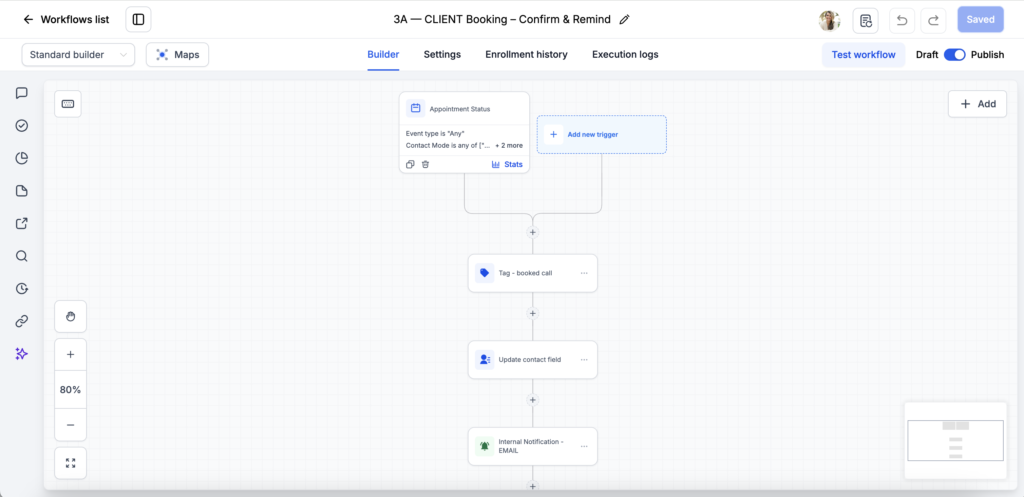
How Business Systems for Contractors Fit Together
These systems work best when they live in one place. That’s why I set up contractors with one all-in-one CRM instead of five separate apps. If you’re new to the idea, my guide on what a CRM for small business does explains it simply.
Also, don’t forget your Google Business Profile. It’s where many local customers find you first, so it should connect to your review system.
Write Down How You Do Things
Business systems for contractors aren’t only software. They’re also written steps. For example, how you onboard a new crew member, how you handle a change order or how you close out a job.
When you write those steps down, someone else can follow them. Then you can finally step back from the small stuff and lead the business.
Start Small With Business Systems for Contractors
You don’t need all six business systems for contractors this month. Instead, start with the one that costs you the most money right now. For many contractors, that’s missed calls or estimate follow-up.
Then add the next system once the first one runs smoothly.
Frequently Asked Questions
What are business systems for contractors?
They’re repeatable ways of handling leads, estimates, scheduling, communication, invoicing and reviews, usually with software behind them.
Do small contractors really need a CRM?
Yes. In fact, smaller crews often benefit most, because the CRM handles follow-up while you’re on the job.
What is the first system a contractor should set up?
Start with whatever loses you the most work. For most contractors, that’s missed calls or estimate follow-up.
Want Systems Built Around Your Business?
This is exactly what we do inside The Profit Hero™. Grab the free OPORD planning guide, or book a free 15-minute consult and we’ll look at where your business is leaking.