
You logged into GoHighLevel for the first time, and your stomach dropped. There are menus inside menus. Workflows, pipelines, funnels, triggers. Everybody online says it can run your whole business, and yet you can’t figure out where to start. Honestly, that’s normal for GoHighLevel beginners.
I get it. I’ve built GoHighLevel accounts for contractors, coaches, therapists and financial advisors, and almost every one of them felt that same overwhelm on day one. So this is GoHighLevel for beginners the way I’d explain it sitting next to you: what to set up first, and what to ignore for now.
What GoHighLevel Actually Does
GoHighLevel is an all-in-one platform for the customer side of a business. In plain English, it replaces a pile of separate tools:
- Your contact list and customer records (the CRM)
- Text and email follow-up
- Online booking calendars
- Websites, landing pages and forms
- Invoices and payments
- Review requests and social media scheduling
So instead of paying for ten apps that don’t talk to each other, everything lives in one place. That’s the big win. However, it’s also why it feels like so much at first.
GoHighLevel for Beginners: The One Rule
Here’s the rule: set up what makes you money or saves you time this month, and ignore the rest.
Most beginners try to build everything at once. They watch hours of tutorials, start five funnels, finish none, and quit. Instead, build one piece, use it, and then add the next.
Step 1: Get Your Contacts In
First, remember that your CRM is only useful if your people are in it. So start by importing your contacts from your phone, your email or that old spreadsheet.
At first, don’t worry about perfect organization. Just add a simple tag like “past client” or “lead” so you can sort them later.
Tip: if your contacts are scattered across email and texts, AI tools can help you pull them into one clean file before you import. This step is where most GoHighLevel beginners feel their first real progress.
Step 2: Connect Your Phone and Email
Next, connect a business phone number and your email so messages flow into one inbox. Then turn on missed-call text-back. When you can’t answer, the caller gets an automatic text, so they don’t move on to your competitor.
In fact, for many service businesses, that one feature pays for the whole platform.
Step 3: Set Up One Calendar
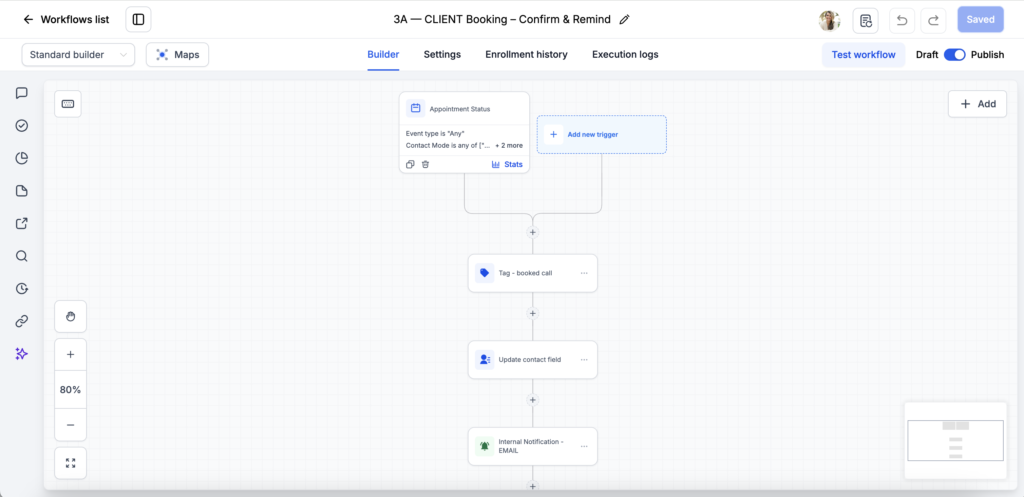
After that, create a single booking calendar for your main type of appointment. Add automatic confirmation and reminder texts.
As a result, clients book themselves, and fewer people forget their appointment.
Step 4: Build One Simple Pipeline
In short, a pipeline shows where every lead stands. Keep it short at first:
- New lead
- Contacted
- Appointment booked
- Won
- Lost
Then move each lead along as things happen. Within a week, you’ll see exactly where people slip through the cracks. For GoHighLevel beginners, that view alone is eye-opening.
Step 5: Turn On Review Requests
Once a job or session is done, GoHighLevel can send a text asking for a Google review. Because it happens every time, your reviews stop depending on your memory.
What GoHighLevel Beginners Can Ignore for Now
Meanwhile, these can wait until the basics run smoothly:
- Complex multi-step funnels
- Long email nurture sequences
- AI chatbots and voice agents
- Membership courses
- Advanced reporting dashboards
They’re powerful tools. Still, they work best on top of a solid foundation, not instead of one.
Common Mistakes With GoHighLevel for Beginners
- Buying templates you don’t understand. Pre-built workflows can pile up and fire at the wrong time. So only turn on what you can explain.
- Skipping text message registration. In the US, business texting requires A2P 10DLC registration. Without it, your texts may not deliver.
- Doing it all alone. GoHighLevel is much easier when someone walks you through it the first time.
And if something you built stops working, my guide on why a GoHighLevel workflow isn’t triggering covers the usual fixes.
Getting Comfortable With the Tech
Here’s what I tell every client: my goal isn’t to make you a tech expert. My goal is to get you comfortable enough with the tech that you understand your business and can delegate it with confidence.
That’s exactly how The Profit Hero™ works. You get a ready-to-use platform built on GoHighLevel, plus hands-on help setting it up around your business.
Frequently Asked Questions
Is GoHighLevel hard to learn for beginners?
It has a learning curve because it does so much. However, if you set it up one piece at a time, most beginners get comfortable within a few weeks.
What should GoHighLevel beginners set up first?
Start with your contacts, your phone and email, missed-call text-back and one booking calendar.
Do I need a website to use GoHighLevel?
No. You can start with the CRM, texting and calendar, then add a website later.
Want Help Getting Started?
If GoHighLevel has been sitting in your browser tabs collecting dust, let’s change that. Grab the free OPORD planning guide, or book a free 15-minute consult.